Kadigan Line: The Single-Line Font for Makers and Creators
In the world of digital design and physical crafting, typography often plays a supporting role. We choose fonts that look good on screen or print crisply on paper. But what happens when your canvas isn't a screen or a sheet of paper, but a piece of wood, a sheet of foil, or a ceramic mug? This is where standard fonts fall short and specialized tools like Kadigan Line step in, transforming how creators add text to their projects.
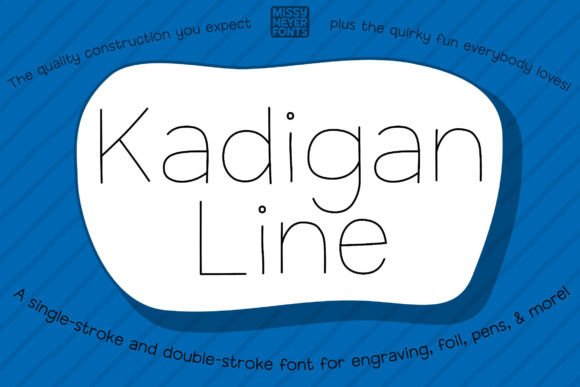
Kadigan Line isn't just another typeface. It's a single-line font, a specific category of font designed not for printing filled letters, but for drawing the outline of letters with a tool. Think of it as the difference between coloring in a letter "A" with a crayon versus drawing its shape with a pencil. Based on the original, playful Kadigan outline typeface, Kadigan Line retains that fun, hand-crafted sans-serif style but adapts it for a new purpose: creation with drawing and scoring tools.
Understanding the Core Concept: What is a Single-Line Font?
To appreciate Kadigan Line, it helps to understand the technology behind it. A traditional font, whether serif or sans-serif, is composed of vector outlines that define the shape of a letter. When you type "Hello" in a word processor, the software fills in these outlines to create solid, printable characters. A single-line font, sometimes called a single-stroke or open-path font, is fundamentally different. The letterforms are defined by a single path, like a line you would draw by hand.
This distinction is critical. When you send a standard font file to a pen plotter, laser engraver in scoring mode, or a foil quill, the machine will try to trace the outline of each letter, resulting in a double line. A single-line font tells the machine to follow one precise path, creating a clean, efficient, and elegant drawn line. Kadigan Line is built on this principle, offering the charm of hand-lettering with the precision of digital design.
Where Kadigan Line Shines: Real-World Applications
The true value of a tool is revealed in its application. Kadigan Line is not for your next report or website. It's for physical, tangible projects where a drawn line adds a special touch. Its utility spans a wide array of hobbies and professions.
For the Home Crafter and Hobbyist
Imagine personalizing a gift with a heartfelt message that looks genuinely hand-drawn. With a cutting machine like a Cricut or Silhouette, you can equip a sketch pen and use Kadigan Line to create stunning, custom greeting cards, gift tags, and invitations. The font's friendly personality makes it perfect for birthday cards, thank-you notes, and wedding stationery. It's also ideal for labeling pantry jars, creating wall art quotes, or designing custom decals for laptops and water bottles.
For Small Business Owners and Artisans
Product presentation is everything. A small business owner selling handmade goods can elevate their branding instantly. Use Kadigan Line with a foil quill to add elegant, handwritten-style names or messages to packaging. Engrave a customer's name onto a cutting board, cheese slate, or leather notebook cover for a high-end, personalized product. The font ensures consistency across products while maintaining that coveted artisanal feel.
For Advanced Makers and Tech Enthusiasts
In more advanced workshops, Kadigan Line finds its place in precision work. On a Glowforge or other laser engraver, the font can be used for scoring delicate designs onto acrylic, wood, or leather without cutting all the way through. For those working with jewelry, an engraving tool paired with Kadigan Line can inscribe fine, legible text onto pendants or bracelets. Its compatibility with Infusible Ink pens also opens up possibilities for creating permanent, vibrant designs on compatible surfaces like polyester fabrics and ceramic coasters.
The Technical Side: Navigating Versions and Compatibility
One of the most practical aspects of Kadigan Line is its thoughtful design for real-world use. The font is provided in two primary versions: single-stroke and double-stroke. This isn't about style, but about software compatibility.
- Single-Stroke Version: This is the true single-line font where each character is a single, open vector path. It's ideal for software and machines that natively understand open paths, allowing for the most efficient and clean drawing action. Many professional vector programs and advanced plotters work best with this format.
- Double-Stroke Version: Some software, particularly certain consumer-grade cutting machine programs, may not correctly interpret open paths, causing them to appear as "missing." The double-stroke version is a workaround. It consists of two very close parallel paths that mimic the appearance of a single line. This ensures the font is usable across a broader range of platforms, even if the underlying mechanism is slightly different.
The key takeaway is to experiment. Install both versions and test them in your specific software—whether it's Cricut Design Space, Silhouette Studio, Adobe Illustrator, or Inkscape. See which one renders and draws as expected. The goal is to choose the version that gives you the cleanest output for your particular workflow and machine.
Evaluating Kadigan Line for Your Projects
Is Kadigan Line the right choice for you? It depends entirely on your project's needs. Ask yourself these questions:
- What is my output method? If you are printing on a standard printer, Kadigan Line is not suitable. If you are using a drawing tool, scoring blade, or engraver, it's designed for you.
- What aesthetic do I want? If you need a formal, corporate look, this font may be too casual. If you want a friendly, personal, and slightly whimsical touch, it's an excellent fit.
- What is my software proficiency? While using the font is as simple as typing, troubleshooting why a line isn't drawing correctly (e.g., using the wrong stroke version) requires a basic understanding of your design software's handling of vector paths.
Consider a real-world scenario: You run an Etsy shop selling custom engraved wooden signs. For a rustic farmhouse sign with a family name, Kadigan Line's hand-drawn charm perfectly complements the wood grain. You would use the single-stroke version in your laser software to efficiently score the text, resulting in a beautiful, tactile finish. Conversely, for a corporate client wanting a logo engraved on metal pens, you might opt for a more structured, technical single-line font. Understanding this context is key to using Kadigan Line effectively.
Final Thoughts on Creative Typography
Kadigan Line represents a fascinating intersection of digital design and physical making. It moves typography off the flat page and into the three-dimensional world of crafted objects. Its strength lies not in being a universal solution, but in being a specialized, high-quality tool for a specific creative niche.
By understanding its purpose, exploring its applications, and correctly navigating its technical formats, creators can unlock a new level of personalization and artistry. It empowers you to add a human touch to machine-made projects, making every greeting card, every engraved gift, and every scored design feel uniquely yours. In the end, that's the true value of a tool like Kadigan Line—it helps you make things that matter, beautifully.