Designing with Charm: A Practical Guide to Using the Missera Signature Font
Understanding Your Design Assets
In the world of digital creation, the tools you select define the efficiency of your workflow and the quality of your output. Whether you are a freelancer building a brand identity, a small business owner creating marketing collateral, or a hobbyist designing invitations, typography remains a critical element of visual communication. Among the vast array of options available to designers today, Missera Signature stands out as a distinct asset that balances aesthetic appeal with technical functionality. It is not merely a typeface; it is a design component crafted to add a specific emotional resonance to your projects. Understanding how to categorize and utilize this font is the first step in integrating it effectively into your creative process.
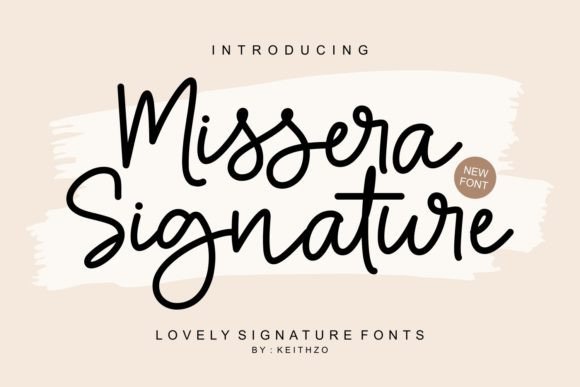
Missera Signature is best described as a cute and charming font characterized by its harmonious outlined style. Unlike heavy, blocky typefaces that demand attention through sheer volume, or overly complex scripts that can become illegible, Missera Signature offers a lighter touch. It is designed to brighten up designs, providing a friendly and approachable vibe. For professionals, recognizing this specific stylistic trait is essential. It determines the context in which the font is appropriate. For instance, it fits perfectly into lifestyle branding, wedding stationery, and playful social media graphics, but it may be less suitable for corporate legal documents or high-density data sheets. By identifying the "personality" of the font early in the planning phase, you save time and ensure consistency across your design system.
The Technical Foundation: PUA Encoding and Workflow
One of the most significant aspects of Missera Signature from an implementation standpoint is its PUA (Private Use Areas) encoding. For many creators, technical barriers often disrupt the creative flow. You might find a beautiful glyph or a stylistic ligature in the font preview, only to discover later that standard software cannot access it without complex workarounds. Missera Signature eliminates this friction point. Because it is PUA encoded, every glyph and ligature is accessible, regardless of the software you are using.
This technical feature plays a crucial role in the execution phase of your workflow. Whether you are working in Adobe Illustrator, Photoshop, Canva, or even basic text editors, you can easily access the full character set. This compatibility reduces the need for third-party font managers or "glyph finder" applications, streamlining your process. For the productivity-minded user, this means fewer steps between concept and completion. You can confidently add this font to your projects knowing that the technical infrastructure supports a seamless creative experience. This reliability allows you to focus on the design itself rather than troubleshooting software limitations.
Strategic Implementation in Real-World Projects
Integrating a new font into your library requires more than just installation; it requires a strategy for usage. Missera Signature is versatile, but its true value is realized when applied to the right contexts. Below is a breakdown of how different professionals can implement this font into their specific workflows.
For Branding and Marketing Professionals
When developing a brand identity, consistency is key. Missera Signature can serve as a secondary or accent typeface to complement a primary sans-serif or serif font. Its outlined, charming nature makes it ideal for specific elements where you want to evoke emotion without overwhelming the viewer.
- Social Media Assets: Use the font for quotes, call-to-action overlays, or story highlights. The "cute" aesthetic aligns well with lifestyle, beauty, and wellness niches.
- Email Headers: In email marketing, standing out in a crowded inbox is difficult. A distinct header font like Missera Signature can increase visual engagement and click-through rates.
- Website Accents: Apply the font to specific UI elements, such as "Add to Cart" buttons or section dividers, to soften the user interface and make the browsing experience more inviting.
For Event Planners and Stationery Designers
The font’s description highlights its ability to "brighten up" designs, making it a prime candidate for event-related materials. In the workflow of an event planner, typography is often the bridge between the theme of the event and the physical or digital invitation.
- Invitations and Save-the-Dates: The harmonious flow of the letters mimics natural handwriting but with better legibility and consistency. This is crucial for printed materials where clarity is non-negotiable.
- Menu Cards and Programs: Use Missera Signature for headings or decorative text within a program booklet. It pairs well with clean, geometric fonts for the body text, creating a hierarchy that guides the reader's eye.
For Educators and Content Creators
Engagement is a metric that educators and content creators track closely. Visual aids that are dry or overly corporate can disengage an audience. Missera Signature offers a solution for creating materials that feel personal and accessible.
- Digital Worksheets: Teachers can use the font to create headers for worksheets that feel less intimidating and more inviting to students.
- YouTube Thumbnails: The outlined style of the font ensures that it remains legible even at smaller sizes or when placed over busy video thumbnails, provided the contrast is managed correctly.
Integration with Design Tools and Resources
No font exists in a vacuum. The effectiveness of Missera Signature depends on how well it interacts with other assets in your design ecosystem. A practical approach to implementation involves considering pairing and color theory.
Because Missera Signature has a distinct personality, it generally pairs best with neutral, grounded typefaces. For example, combining it with a clean sans-serif like Montserrat or Lato creates a balance between playfulness and professionalism. This interaction ensures that your message is communicated clearly while maintaining a creative flair. Furthermore, consider the weight of the font. As an outlined or lighter weight font, it requires sufficient contrast against the background. Before finalizing a design, always conduct a quick legibility test on different devices—desktop, tablet, and mobile—to ensure the "charming" aspect doesn't turn into "unreadable" on smaller screens.
Long-Term Usability and Organization
For freelancers and business owners, asset management is an ongoing task. Investing in a font like Missera Signature is a long-term decision. To maximize the return on this investment, proper organization is necessary.
Create a dedicated folder or library within your design software specifically for "Display" or "Script" fonts. Tagging Missera Signature correctly allows you to retrieve it quickly when a project calls for a specific tone. Additionally, because the font is PUA encoded, you might find yourself using the special ligatures frequently. It is helpful to create a "cheat sheet" or a reference document that lists your favorite glyphs from the font. This preparation step significantly speeds up the design process, as you won't have to scroll through the character map every time you want to use a specific swash or tail.
Quality Control and Final Output
The final stage of any design process is quality control. When using a decorative font like Missera Signature, pay close attention to kerning—the spacing between characters. While the font is designed to be harmonious, specific letter combinations in custom projects sometimes require manual adjustment to look perfect. This attention to detail separates amateur work from professional output.
Furthermore, consider the medium of delivery. If you are printing materials, ensure that the outlined nature of the font translates well to paper. Sometimes, thin lines can disappear on lower-quality print stocks. In digital formats, ensure the font is embedded or converted to outlines (vectors) in the final PDF to prevent rendering issues on the recipient's end. By following these practical steps, you ensure that the charming quality of Missera Signature remains intact from your screen to the final product.
Conclusion
Missera Signature is more than just a collection of vector paths; it is a functional tool designed to enhance the emotional impact of your work. By understanding its technical capabilities, such as PUA encoding, and applying it strategically within your specific workflow, you can elevate the quality of your designs. Whether you are crafting a brand identity, designing an invitation, or creating educational content, this font offers a reliable way to add charm and professionalism to your projects. Integrate it thoughtfully, and you will indeed love the results.