Integrating Rosy Tale: A Practical Workflow for Elegant Handwritten Design
In the landscape of digital design, typography is often the silent workhorse that determines the success of a project. When a project calls for a personal, human touch without sacrificing legibility, the Rosy Tale handwritten script font emerges as a reliable solution. This typeface is not merely a decorative element; it is a functional asset designed to bridge the gap between organic warmth and professional clarity. For creators ranging from small business owners to digital planners, understanding how to integrate a font like Rosy Tale into a production workflow is essential for maintaining efficiency and quality.
Understanding the Technical Foundation
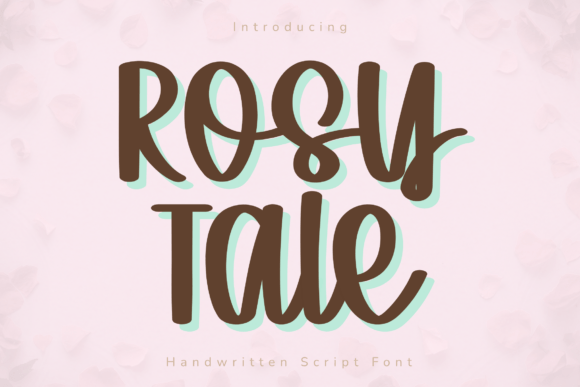
Before incorporating any typeface into a workflow, a professional must evaluate its technical specifications. Rosy Tale is characterized by clean, elegant curves and refined letterforms. Unlike chaotic or overly distressed handwritten fonts, Rosy Tale prioritizes readability. This distinction is critical for implementation. When a font is legible, it reduces the cognitive load on the viewer and minimizes the time a designer spends adjusting kerning and tracking to make text understandable.
The font creates a natural handwritten aesthetic while maintaining the structural integrity required for professional output. This balance makes it suitable for both large-scale display headers and smaller, informative subtext. Its design philosophy centers on versatility, ensuring that it does not look out of place whether used in a high-end branding kit or a casual digital sticker set.
The Cricut and Cutting Machine Workflow
One of the most specific and practical applications of Rosy Tale is in the realm of physical production, particularly with Cricut and other cutting machines. The process of vector cutting requires fonts that feature smooth, consistent strokes. Jagged edges or sharp, erratic angles common in other script fonts often lead to tearing vinyl, snagging cardstock, or requiring excessive weeding time.
When integrating Rosy Tale into a cutting workflow, the font acts as a stabilizing element. Because the strokes are smooth, the machine blade can navigate the curves with minimal friction. This results in cleaner cuts and a more efficient production cycle. For a small business owner producing decals or greeting cards, this efficiency translates directly into saved labor costs and reduced material waste. The font effectively solves the problem of "fussy" script fonts that look good on screen but fail in execution.
Preparation for Physical Production
Before sending a design to the cutting mat, preparation is key. When using Rosy Tale for heat transfer vinyl (HTV) or adhesive vinyl, users should pay attention to the spacing between letters. While the font is designed with excellent default tracking, complex words may occasionally require manual kerning adjustments in design software like Adobe Illustrator or Cricut Design Space. Ensuring that the connecting loops of the letters do not overlap excessively will guarantee a smooth cut path.
Digital Planning and Organization Systems
Moving from physical to digital, Rosy Tale serves a distinct purpose in the ecosystem of digital planning. In applications such as GoodNotes or Notability, the visual hierarchy of a planner is crucial for usability. A planner that is too sterile can feel uninspiring, while one that is too chaotic can hinder productivity.
Rosy Tale fits into the "decoration" and "highlighting" stages of digital planner creation. It is best used for headers, section titles, and motivational quotes. By utilizing this font for specific elements, creators can distinguish between different types of information—such as separating a "To-Do" list from a "Reflection" section. The font’s elegance adds a soft, calming touch to the interface, which can positively influence the user’s daily interaction with their productivity system.
Branding and Social Media Integration
For entrepreneurs and marketers, consistency is the currency of brand trust. Rosy Tale can be a core component of a visual identity, particularly for brands aiming to project approachability, creativity, or luxury. However, integration requires a strategy. Using a script font for every piece of text is a common mistake that leads to visual fatigue and poor accessibility.
The optimal workflow for using Rosy Tale in branding is to pair it with a clean, sans-serif typeface. Rosy Tale should be reserved for high-impact moments: the logo wordmark, the main headline of a social media graphic, or the sign-off in an email newsletter. The surrounding body text should remain simple to ensure the message is received quickly.
Social Media Execution
When designing for platforms like Instagram or Pinterest, the loading speed and visual clarity of text are paramount. Rosy Tale performs well in these environments because of its high contrast and distinct shapes. When creating templates in Canva or Photoshop, designers can set Rosy Tale as the standard for "Statement" text blocks. This creates a repeatable process where new content can be generated quickly without sacrificing the brand's aesthetic standards. The font ensures that even static images convey a sense of movement and personality.
Compatibility and Long-Term Usability
A practical consideration for any professional is the longevity and compatibility of their assets. Rosy Tale is designed to be compatible with a wide range of operating systems and design software. This cross-platform reliability is vital for collaborative workflows where a file might be created on a Mac, edited on a PC, and printed at a third-party service bureau.
Furthermore, the "clean" nature of the font implies that it has been properly encoded. For the end-user, this means fewer technical glitches when installing or rendering the font. It is a stable asset that does not require constant troubleshooting, allowing the creator to focus on the creative process rather than technical support.
Quality Control and Final Output
The final stage of any project is quality control. When reviewing a design utilizing Rosy Tale, the focus should be on the flow of the text. Because it is a script font, the connections between letters should appear fluid. If a specific letter combination looks awkward, it is often a spacing issue rather than a font flaw.
Additionally, consider the medium. Rosy Tale retains its elegance at larger sizes, but like most script fonts, it requires careful testing at very small sizes to ensure the loops do not close up. For print projects, a test print on the specific paper stock is recommended to see how the ink interacts with the font's fine curves. For digital projects, checking the rendering on mobile devices ensures the legibility holds up on smaller screens.
Conclusion
Rosy Tale is more than just a collection of letters; it is a versatile tool designed for modern creators. By understanding its strengths—smooth curves, reliable cutting paths, and elegant readability—users can integrate it effectively into diverse workflows. Whether the goal is to produce physical goods with a Cricut, organize a digital life, or build a recognizable brand, Rosy Tale provides the stylistic foundation to execute those ideas with grace and professionalism. Its value lies in its ability to adapt to the creator's needs, serving as a reliable bridge between a rough concept and a polished final product.